


Barn2 Product Tabs vs Smart Tabs: Which custom product tabs plugin gives you the features and customizations you need to make your product tabs match your branding and boost the conversion?
Product tabs do much more than display information– they shape how shoppers understand your product. Think of them as your 24/7 sales team. If they’re clean, smart, and well-organized, shoppers gain trust and feel ready to buy.
To make your decision easier, we tested both Barn2 Product Tabs and Smart Tabs extensively. We reviewed their features, customization options, user experience, and overall performance– then, we are writing this product tabs plugin comparison blog. We are also attaching the authentic reference links and screenshots for transparency. So, this blog will help you justify the facts and confidently pick the right plugin for your store.
Let’s get started.
What is Barn2 Product Tabs?
Barn2 Product Tabs is a WooCommerce plugin that lets you create and manage custom product page tabs for your online store. It helps you add unlimited additional tabs with flexible content– beyond the default Description, Reviews, and Additional Information.
What is Smart Tabs?
Smart Tabs is a popular WooCommerce custom product tab plugin that lets you create unlimited custom product tabs, assign them to all or specific products, and widely customize them for all or per product.
BARN2 Product Tabs vs Smart Tabs
Let’s explore the side-by-side true comparison of BARN2 Product Tabs vs Smart Tabs, along with official links and visuals to justify the transparency.
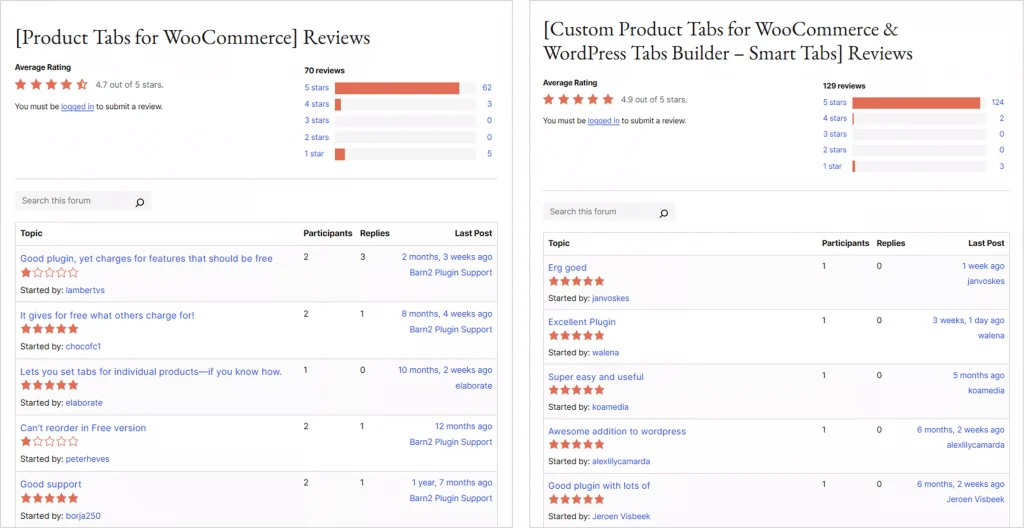
Overview Based on wordpress.org
| Aspects | Product Tabs | Smart Tabs |
|---|---|---|
| Developer | Barn2 | ShapedPlugin, LLC |
| WordPress Official Ratings | 4.7 | 4.9 |
| WordPress Official Reviews | 70 | 128 |
| Recent 10 Reviews | 6 Five Stars | 9 Five Stars |
| For | WooCommerce | WooCommerce & WP |
| Users | 10k+ | 10k+ |
| Pricing | $79 | $39 |
| Choose | Product Tabs | Smart Tabs ✅ |
Screenshot
Tab Layouts & Templates
| Layouts & Templates | Product Tabs | Smart Tabs |
| Default Tab Layout | ✅ | ✅ See Demo |
| Additional Ready Layouts | ❌ | ✅ 6+ layouts |
| Accordion Below Gallery 🔥 | ❌ | ✅ See Demo |
| Accordion Bellow Summary 🔥 | ❌ | ✅ See Demo |
| Vertical Left | ❌ | ✅ See Demo |
| Vertical Right | ❌ | ✅ See Demo |
| Horizontal Below Summary | ❌ | ✅ See Demo |
| WordPress Tab Layouts | ❌ | ✅ 5 Layouts |
Product Tab Types: Image, Video, FAQ, and more
Tab Types | Product Tabs | Smart Tabs |
| Dedicated Tab Types | ❌ | ✅ 8+ Tab Types |
| Text Content Tab | ✅ | ✅ |
| Rich Formatted Content | ✅ Code editor | ✅ Code editor |
| Image Tab | ❌ | ✅ See Demo |
| Masonry Image Gallery | ❌ | ✅ |
| Video Tab | ❌ | ✅ See Demo |
| Masonry Video Gallery | ❌ | ✅ |
| Seamless Video Sources | 1 | 5 |
| FAQ Tab | ✅ | ✅ See Demo |
| FAQ Schema Markup | ❌ | ✅ |
| File/Downloads Tab | ❌ | ✅ See Demo |
| Store Map/Location Tab to attract locals | ❌ | ✅ No API required |
| Contact Form Tab | ❌ | ✅ See Demo |
| Related Products Tab | ❌ | ✅ |
| WP Custom Post Type | ❌ | ✅ Post, product, etc. |
Tab Assignment and Management
| Tab Assignment & Control | Product Tabs | Smart Tabs |
| Assign to All | ✅ | ✅ |
| Assign by Products | ✅ | ✅ |
| Assign by Categories | ✅ | ✅ |
| Assign by Tags | ✅ | ✅ |
| Assign by Brands | ❌ | ✅ |
| Assign by SKUs | ❌ | ✅ |
| Assign by Size & Color | ❌ | ✅ |
| Assign by Shipping Class | ❌ | ✅ |
| Assign by Product Visibility | ❌ | ✅ |
| Exclude from Selected Ones | ❌ | ✅ |
| Hide Tab per Product | ✅ | ✅ |
| Customize per Product | ✅ | ✅ |
Responsiveness, SEO, & Accessibility
| Features | Yith Tab Manager | Smart Tabs |
| Dedicated Mobile-ready Layouts | ❌ | ✅ |
| Turn Tabs to Accordion on Mobile | ✅ | ✅ |
| Mobile Breakpoint | ✅ | ✅ |
| Schema Markup | ❌ | ✅ |
| SEO-friendly Hash Anchors | ❌ | ✅ |
| Search in Tab Content | ✅ | ✅ |
| Custom Tab Icons | ❌ | ✅ |
| Hide Tabs on Mobile | ❌ | ✅ |
Styes & Customizations
| Design & Customizations | Product Tabs | Smart Tabs |
| Customize Default Product Tabs | ✅ | ✅ |
| Global & Per Product Content Editing | ✅ | ✅ |
| Multiple Tab Styles | ❌ | ✅ |
| Custom colors to match your brand | ❌ | ✅ Full Freedom |
| Custom spacing for clean tab UI | ❌ | ✅ |
| Custom sizes | ❌ | ✅ |
| Custom border & radius | ❌ | ✅ |
| Custom Hover Color | ❌ | ✅ |
| WYSIWYG editor | ✅ | ✅ |
| Code editor | ✅ | ✅ |
| Insert Shortcode | ✅ | ✅ |
| Mouseover Tab Activation Option | ❌ | ✅ |
| Custom Initial Open Tab | ❌ | ✅ |
| Multiple Icon Positions | ❌ | ✅ |
| Multiple Tab Alignments | ❌ | ✅ |
| Page Builder Support | ✅ | ✅ |
| Google Fonts Support | ❌ | ✅ 1500+ fonts |
| Advanced typography | ❌ | ✅ |
| Drag & Drop Ordering | ✅ | ✅ |
| Import/Export Tabs | ❌ | ✅ |
To keep this blog concise, we have compared all the key things of Barn2 Products Tabs and ShapedPlugin’s Smart Tabs. You can now confidently pick the best custom product tab plugin for your store.
Note: This comparison is subject to time and updates. A new update may come with changes at any time. Therefore, if the blog has not been recently updated, you can browse the official sites of Smart Tabs and Barn2 Tabs to explore the latest features.
Which Product Tab Plugin to Choose?
Both Smart Tabs and Barn2 Product Tabs are great options. However, the transparent comparison tables and screenshots in many criteria have already guided you when choosing Barn2 Product Tabs and when to choose Smart Tabs.
When to choose Smart Tabs?
When you need to create sophisticated custom product tabs, assign them to all or specific products, and customize them globally or per product with full freedom, you can choose Smart Tabs for a higher conversion rate.
When to choose Barn2 Product Tabs?
When you need to add basic product tabs with no customization options, choose Barn2 Product Tabs. It’s simple and quick to start.


Leave a Reply