


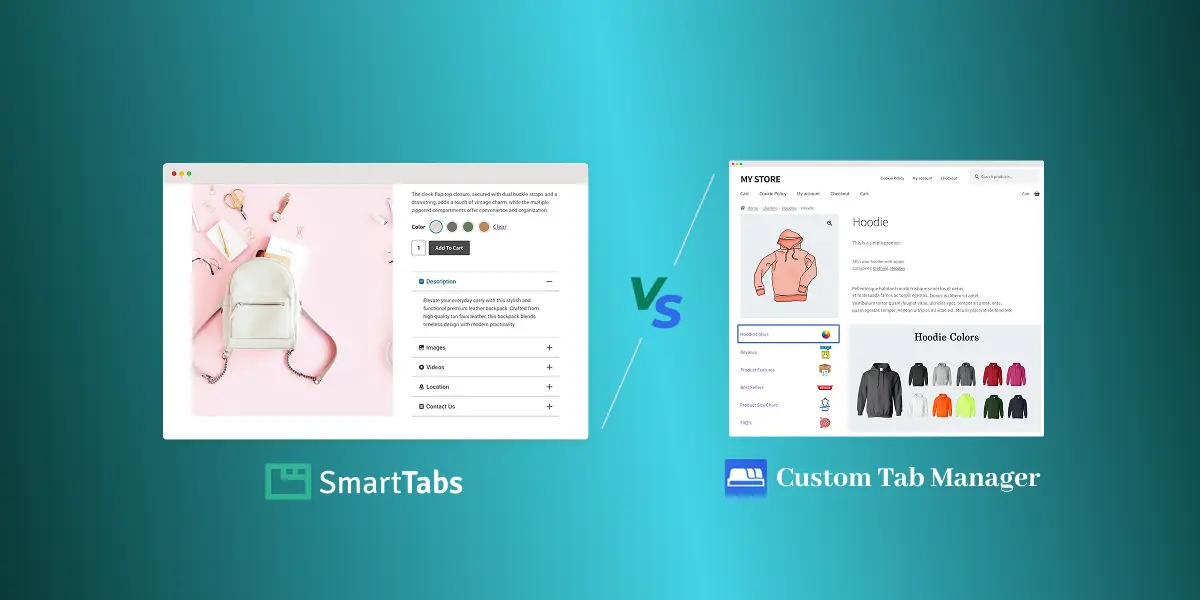
Hey, WooCommerce Shop Owners! If you want to increase your product page conversions, one of the most effective ways is to display additional product information in structured product sections with tidy and well-organized layouts.
A well-designed product tab section lets you display Specifications, Size Charts, Videos, FAQs, and more rich content in a clean, conversion-focused layout — making it easier for your customers to find the right information right on the product page, ultimately improving conversion rates.
To add dedicated custom product tabs to your WooCommerce pages, you need a reliable tab manager plugin.
In this post, I’ll compare the top two popular custom product tab plugins — Smart Tabs Pro by ShapedPlugin and Custom Product Tabs Manager for WooCommerce by Addify, helping you decide what sets them apart and choose the best tab solution for your store in 2025.
Let’s dive in!
Introduction to Smart Tabs Pro & Custom Product Tabs Manager
Smart Tabs Pro by ShapedPlugin
Smart Tabs Pro is a premium WooCommerce tab management & WordPress Tab builder plugin built for modern, high-conversion product pages. Over 20000+ WooCommerce stores and WordPress business owners use WP Tabs to add, create unlimited custom product tabs, manage, or rename WooCommerce default tabs efficiently.
Furthermore, you can assign tabs globally, specific products, categories, tags, brands, attributes, SKUs, shipping classes, product visibility, and more. You can also hide, override, or exclude tabs on individual products — giving you ultimate control over every product page.
Key Features of Smart Tabs Pro:
- Unlimited Rich-Content Tabs (Text, Image, Video, FAQ, Map, Size Chart, File, Related Products)
- Replace WooCommerce-related Products with the Latest, Best-Selling, and On-Sale products
- Stunning Image Gallery Layouts with LightBox (Grid & Masonry)
- Multiple Video Support: Inline or LightBox (YouTube, Vimeo, Wistia, TikTok, & Self-hosted)
- Advanced Tab Assignment by Globally, Categories, Brands, Per product, Attributes, and more.
- 9+ Modern Responsive Tab Layouts: 4+ Horizontal, 3+ Vertical, Accordion, and more.
- SEO-friendly URLs, FAQ schema, and in-tab search
- Drag-and-drop ordering and per-product override
- Highly customizable styling, advanced typography controls, and many more.
Custom Product Tabs Manager for WooCommerce by Addify
Custom Product Tabs Manager by Addify is an ultimate solution for adding extra tabs to your WooCommerce product pages. It allows store owners to display additional product information using a basic content editor, supporting text, images (via the editor), FAQs, and Contact Form 7 integrations.
You can assign tabs globally, to specific products, or to categories and tags, making it simple to manage where information appears. Beyond these, it allows you to customize, such as renaming or hiding default WooCommerce tabs and controlling visibility by user roles. Moreover, style the tab with custom icons, text color, and tab background images.
Key Features:
- Unlimited additional tabs beyond WooCommerce defaults
- HTML/WYSIWYG editor support for text, images, size charts, FAQs, and HTML content
- Embed Video with YouTube & Vimeo Hosting
- Assign tabs to Global, Specific products, Categories, or Tags
- Add custom product tabs at the Product Level
- Rename or hide default WooCommerce tabs
- Standard Tab Stylings with Custom Icons, Text Coloring, and Tab Background Image
- User-role-based tab visibility
- Reorder tabs and override Global tabs
Now, Let’s Explore In-Depth Features of the Smart Tabs Pro & Custom Tabs Manager from below:
WooCommerce Tabs Plugins Comparison:
Smart Tabs Pro vs Custom Tabs Manager
| Key Features |  Smart Tabs Pro by ShapedPlugin |  Custom Tabs Manager by Addify |
|---|---|---|
| Dedicated Tab Types | ✅ 8 More Dedicated Tabs (Text, Image, Video, FAQ, Contact Form, Size Chart, Map, File, Related Products) | ❌ No Dedicated Tab Types |
| Rich Content Tab | ✅ Unlimited Rich-Content tabs with WYSIWYG editor | ✅ Unlimited content tabs with WYSIWYG editor |
| Dedicated Image Tab | ✅ Yes, with Gallery Layouts + Lightbox | ❌ No (only via editor) |
| Dedicated Video Tab | ✅ Yes | ❌ No (only via editor) |
| Dedicated FAQ Tab | ✅ Stylish accordion + 3 open modes | ❌ Simple FAQ via editor |
| FAQ Schema Markup | ✅ Yes | ❌ No |
| Dedicated Contact Form Tab | ✅ Yes (Contact Form 7 supported + email destination) | ❌ Only embeds CF7 inside editor |
| Dedicated Size Chart Tab | ✅ Yes | ❌ No (only via editor) |
| Dedicated Map/Location Tab | ✅ Yes (Google Maps supported) | ❌ No |
| Dedicated File/Downloads Tab | ✅ Yes | ❌ No |
| Dedicated Custom Related Products Tab | ✅ Yes | ❌ No |
Layouts & Stylings: Dedicated Design for Smarter Product Tabs
| Layouts & Stylings | Smart Tabs Pro | Custom Tabs Manager |
|---|---|---|
| Modern Layouts | ✅ 6+ layouts (Horizontal, Vertical, Accordion) | ❌ No layouts |
| Tab Styles | ✅ Multiple styles (Classic, Line, Button, Rounded) | ❌ No styles |
| Tab Icons | ✅ Unlimited icons + upload | ✅ Basic icon & background upload |
| Advanced Styling Controls | ✅ Spacing, borders, typography | ❌ No advanced controls |
| Google Fonts Support | ✅ 1500+ fonts | ❌ No |
Let’s See Multi-Media Supports:
| Media Supports | Smart Tabs Pro | Custom Tabs Manager |
|---|---|---|
| Image Galleries | ✅ Grid & Masonry with Lightbox | ❌ No gallery layouts |
| Image with Link | ✅ Yes, all formats | ✅ Only add with Hyperlink |
| Video Hosting | ✅ YouTube, Vimeo, Wistia, TikTok, Self-hosted | ✅ YouTube, Vimeo only |
| Video Play Mode | ✅ Inline or Lightbox | ❌ Editor-based only |
| Downloadable Files | ✅ Yes | ❌ No |
Advanced Tab Assignments: Ultimate Control Over Tab Shows
| Tab Assignment & Control | Smart Tabs Pro | Custom Tabs Manager |
|---|---|---|
| Global Products | ✅ Yes | ✅ Yes |
| Specific Products | ✅ Yes | ✅ Yes |
| Assign by Category | ✅ Yes | ✅ Yes |
| Assign by Tag | ✅ Yes | ✅ Yes |
| Assign by Brand | ✅ Yes | ❌ No |
| Assign by SKU | ✅ Yes | ❌ No |
| Assign by Size & Color | ✅ Yes | ❌ No |
| Assign by Shipping Class | ✅ Yes | ❌ No |
| Assign by Product Visibility | ✅ Yes | ❌ No |
| Exclude Specific Products | ✅ Yes | ❌ No |
| Hide Tab per Product | ✅ Yes | ❌ No |
| Override per Product | ✅ Yes | ✅ Yes |
| User Role Visibility | ❌ No | ✅ Yes |
Tabs Responsiveness on Small Screens & SEO:
| Mobile Responsiveness & SEO | Smart Tabs Pro | Custom Tabs Manager |
|---|---|---|
| Mobile-Optimized Layouts | ✅ Fully optimized | ❌ Basic only |
| Auto Switch Tabs to Accordion on Mobile | ✅ Yes | ❌ No |
| Expand/Collapse Icons | ✅ Yes | ❌ No |
| Schema Markup | ✅ Yes | ❌ No |
| Search in Tab Content | ✅ Yes | ❌ No |
| SEO-friendly Hash Anchors | ✅ Yes (Slug / Slug + ID) | ❌ No |
Complete Customization & Control:
| Tab Customization & More | Smart Tabs Pro | Custom Tabs Manager |
|---|---|---|
| Drag & Drop Ordering | ✅ Yes | ✅ Yes |
| Multiple Tab Alignments | ✅ Yes | ❌ No |
| Replace Related Products Tab | ✅ Yes | ❌ No |
| Import/Export Tabs | ✅ Yes | ❌ No |
| Page Builder Support | ✅ Elementor, Divi, Gutenberg | ✅ Gutenberg & Classic only |
| Performance | ✅ Optimized for multimedia-heavy pages | ✅ Good for simple pages |
More Features, Lower Price:
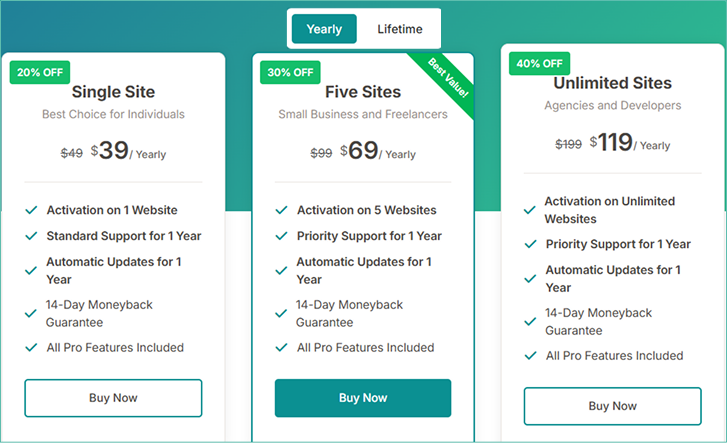
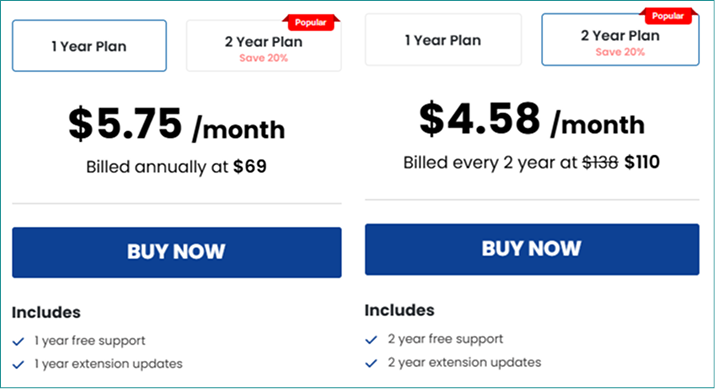
At only $39/year, Smart Tabs Pro gives richer features, deeper customization, and modern design controls that go far beyond basic tab management. Meanwhile, Custom Product Tabs by Addify costs $69/year —a higher price for a simpler, more limited tool. If you’re looking for advanced control while saving money, you can go with Smart Tabs Pro.
Smart Tabs Pro
Custom Product Tabs Manager
Which Tabs Plugin is the Best Choice for You?
By the end of the in-depth analysis above, covering key features, styling, and customization of Smart Tabs Pro and Custom Tab Manager for WooCommerce, I can state that both are highly useful for any WooCommerce shop.
If you ask me to recommend the best one, I suggest you choose based on your store’s needs and preferences. Custom Tab Manager by Addify is great for stores that need simple, easy-to-manage custom product tabs.
Smart Tabs Pro, on the other hand, is the advanced tab solution for stores looking to upgrade product pages with rich multimedia content, flexible layouts, SEO-friendly tabs, and advanced tab assignments. Its features address real pain points for medium-to-large WooCommerce stores.
So, why wait? Choose and download your favorite plugin today, and start creating product pages that enhance customer experience and boost sales!
Important Disclaimer: This comparison reflects features and pricing available at the time of writing. Both plugins may update their features with regular releases, plans, or pricing over time. For the most accurate and up-to-date information, we recommend checking each plugin’s official website.


Leave a Reply